Welcome music producers!
This is Coruscate with The Incomplete Orchestra and I’m going to do a series of music tutorials with elements of production I use.
First up is AN EXTREMELY USEFUL ZOMG plug in called “Vinyl” from Izotope and the best part is it is absolutely free.
I use it with my DAW, plain as dry cereal. But you can also use it with NKS / Kontakt. As I don’t have Kontakt yet, I’m no help there.
As well as another support document that goes into more detail here.
Alright, so here’s what the plug in looks like, fully activated inside Acid 11. (go with better tools and I will at some point)
So like all effects, where you place it in the side chain matters, I usually put it at the end.
Please note that you can apply it to individual tracks or the master track as well.
It comes with some effects set to default. Let’s discuss those first.

Year Control
The year is set to 1970.
1950 turns audio to “mono.” For every other year, if you’ve listened to old records, you can hear the authentic aging of the sound by the audio spectrums they could reproduce then. This can also be used to control background vocals!! It’s a handy shortcut!!!
Use your ear but this is a fun way to master sounds if you have an interest.

Dust Control
This adds the sound of dust particles interfering with the stylus needle. BEWARE when adding this vst to multiple channels as the dust will stack.
Warp Control
This is a good shortcut for flange effects. The higher you turn it the more warped the sound is. It’s great on sustained notes like violins and organs. I have not experimented with “model” on the knob yet.
Wear Control
This gives your sounds the authetic sound of what happens to real wax recordings over time and use. You can also use it to create “radio” style transmissions from vocals, it has the right feel.
Scratch Control
This causes the audio to suddenly “leap” like a skipping stylus needle but it keeps playing through.
Other Controls
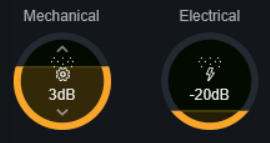
Mechanical / Electrical
They may not look like slide controls they are. If you are familiar with real turntables and the kinds of feedback and electrical noises they have, especially when they’re old, this is accurate!!!

Lo-Fi Control
As it suggests, it bad-downgrades your sound. Honestly I wouldn’t recommend it unless you need harsh downgrading. The other controls, especially wear, achieve this effect better.
Spindown
Okay this one is fun. It replicates your sound winding down like a record that the speed to the turntable has been cut. It’s not a slide, it’s an on or off… and once reactivated it goes right up to normal speed at wherever the cursor is at in the song. It doesn’t cut back from when it stopped. It also doesn’t “start” so if you want the sound of a record starting, reverse your sounds in a separate file, export, and reverse the result. In my DAW if I use this effect too many times in a single song it’ll mess up the audio and I have to micro-export sections to finalize the final with. So make backups as you go if you use more than 10 spindown effects in a song.
 Tangents Brand : Free Entertainment, no BS
Leave a comment